
Clock Radio By PN Free6.3.0 - Google Play
You'll be able to see results in few seconds.
Publisher Description
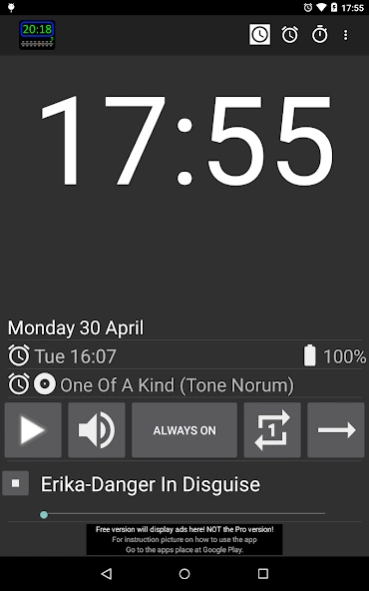


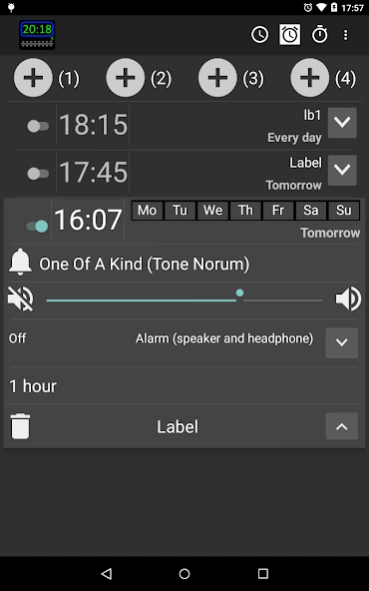
Clock Radio / Alarm clock / Player (including: Internet streamed radio stations)
Clock radio / Alarm clock / Player (including: Internet streamed radio stations)
NEW VERSION 6.x
- Now using ExoPlayer 2.7.3, Android Mediaplayer is only used for ringtones.
- Rewritten MusicPlayer and AlarmPlayer
- Improved notification handling
- Removed permission READ_PHONE_STATE, now using AUDIO_FOCUS instead
Use your Android phone as an:
- Alarm: Wake up to a song, artist, album, playlist or internet streamed radio. (for Internet streamed compatible formats, see: http://developer.android.com/guide/appendix/media-formats.html)
- Clock Radio: Time is displayed as your phone's time settings (Changeable here: 'Program / Settings / Date & time')
- Media player: Listen to the same tunes that you wake up to when you are awake
- Easier to choose an radio station, Choose country and then the radio station.
- Rewritten select alarm signal / player (song/artist/album/playlist/internet radio station)
- Volume volume controll (As version 1.x, 2.x, 3.x/4.x or custom)
- Stopwatch
- Slide between screens
- Handle Android 6.0 permissions
[Will be added later - Timer (turn on: 'Menu / All settings / Tab choice / Timer')].
This free version is a full version, with ads support.
A Pro version, without ads, is now available $8.
Languages translated: English, Swedish, French, Spanish, Simplified Chinese and Traditional Chinese (some with Google Translate).
Please help me translate a new language or fix an already translated text.
Go here and follow the instructions: http://bypn.se/clock-radio-bypn-translate.html
Known bugs:
- None that I known of. [Want to report a bug, see instructions below]
- New version, please report bugs you find so i can fix them. [Send crash reports or Want to report a bug, see instructions below]
If you find a bug, send an email to peter.nystrom.dev@gmail.com with the following:
- How I can reproduce it
- Your phone's data (with model, resolution, Android version, language).
- Thanks
Quick manual:
-------------
Time tab:
- Time, date, battery: Info for you
- Alarm, alarm signal: Info (Go to \'Alarm tab\' to change)
- Player signal: Press the name of the player signal to change signal
- On/Off button: Plays selected player signal
- Always on/Off in .. button: Short click will toggle between \'Always on\' and \'Off in ..\'. Long click and you can set timeout for \'Off in ..\' model
- Shuffle on/off: Can only be changed when player is off
- Repeat on/off: Can only be changed when player is off
- Prev/Next: Shows only when player is on and if more than 1 song is chosen
- Volume: Does not show with small displays (Ex. ldpi(320x480), not enough space, use the menu instead)
- Dimmer: Dim the screen to increase battery life, hold down 1 second to activate screen saver
- Screensaver: Shows time, date, alarm, alarm signal and player signal.
Alarm tab:
- Customize an alarm: Long click on +(1),+(2),+(3),+(4) or use the menu 'Edit the default alarm (x)' to see that your are in customize mode - instead of the time you will see the name (?) of the button you clicked
- Add an alarm: Short click on +(1), +(2), +(3) or +(4)
- Edit an alarm: Select from the list
- Delete an alarm: Long click on an alarm from the list and select 'delete alarm' or edit the alarm and press the 'Delete' button.
Latest version info is in 'News'.
Full version history is under 'All settings / About / Version history'.
Version 6.x is for Android 5.1 and later!
Version 5.x is for Android 5.0 and later!
Version 4.x is for Android 5.0 and later!
Version 3.6.10 is for Android 4.0.3 - 4.4
Version 2.3.1 is available for Android 2.2.0 - 4.0.2
About Clock Radio By PN Free
The company that develops Clock Radio By PN Free is Peter Nyström. The latest version released by its developer is 6.3.0.
To install Clock Radio By PN Free on your Android device, just click the green Continue To App button above to start the installation process. The app is listed on our website since 2018-10-28 and was downloaded 0 times. We have already checked if the download link is safe, however for your own protection we recommend that you scan the downloaded app with your antivirus. Your antivirus may detect the Clock Radio By PN Free as malware if the download link to com.bypn.android.app.clockradiobypn is broken.
How to install Clock Radio By PN Free on your Android device:
- Click on the Continue To App button on our website. This will redirect you to Google Play.
- Once the Clock Radio By PN Free is shown in the Google Play listing of your Android device, you can start its download and installation. Tap on the Install button located below the search bar and to the right of the app icon.
- A pop-up window with the permissions required by Clock Radio By PN Free will be shown. Click on Accept to continue the process.
- Clock Radio By PN Free will be downloaded onto your device, displaying a progress. Once the download completes, the installation will start and you'll get a notification after the installation is finished.
Program Details
System requirements
Download information
Pricing
Version History
version 6.3.0
posted on 2018-10-28
6.3.0 Fixed NullPointerException: onStopTrackingTouch
6.3.0 Fixed IllegalStateException: StartScreenSaverListener.run
6.2.0 Fixed IllegalStateException: db.alarm.AlarmDao_Impl
6.1.4 Fixed RemoteServiceException: Context.startForegroundService() did not then call Service.startForeground
6.1.3 Now using ExoPlayer 2.9.0
6.1.2 Added android.permission.FOREGROUND_SERVICE, requred for Android 9.0
version 5.1.3
posted on 2018-01-28
5.1.3 Added debug notifications to improved alarm handling for Android 8.x
5.1.2 Fix player volume in Time settings, thanks N Kempf
5.1.2 StackOverflowError: fix
5.1.2 Back to ExoPlayer 2.6.0 (streamings could stop)
5.1.1 Improved alarm handling for Android 8.x
5.1.1 Now using ExoPlayer 2.6.1
5.1.0 From Android 6.0(23), alarms seems to be reRegistered when the app has been closed
5.1.0 Improved alarm handling
5.1.0 Pre release test: NullPointerException: trim() is null in setLabel()
version 3.6.3
posted on 2015-11-01
3.6.3 Fixed crash: NullPointerException, when selected \'Recently added\' and a ringtune, thanks for the report.,3.6.2 Fixed cranh for Android 6.0, set targetSdkVersion 22,not 23,3.6.1 Fixed crash: StaleDataException.,3.6.0 Rebuild for Android 6.0, added support fullBackupContent(for 6.0, not tested),3.5.1 Fixed some bugs.,3.5.0 Fixed crash: java.lang.IllegalStateException: Unknown URL.,3.5.0 Fix for api 19 and newer, setexact now used with alarmmanager
version 1.7.8
posted on 2013-02-06
Several fixes and updates
Disclaimer
Official Google Play Link
We do not host Clock Radio By PN Free on our servers. We did not scan it for viruses, adware, spyware or other type of malware. This app is hosted by Google and passed their terms and conditions to be listed there. We recommend caution when installing it.
The Google Play link for Clock Radio By PN Free is provided to you by apps112.com without any warranties, representations or guarantees of any kind, so access it at your own risk.
If you have questions regarding this particular app contact the publisher directly. For questions about the functionalities of apps112.com contact us.
